kublaro AI Food Photography Generator
Create appetizing food visual concepts for menus, recipes, delivery listings and packaged food campaigns with Smart Routing across image and video models.
June 23, 2026
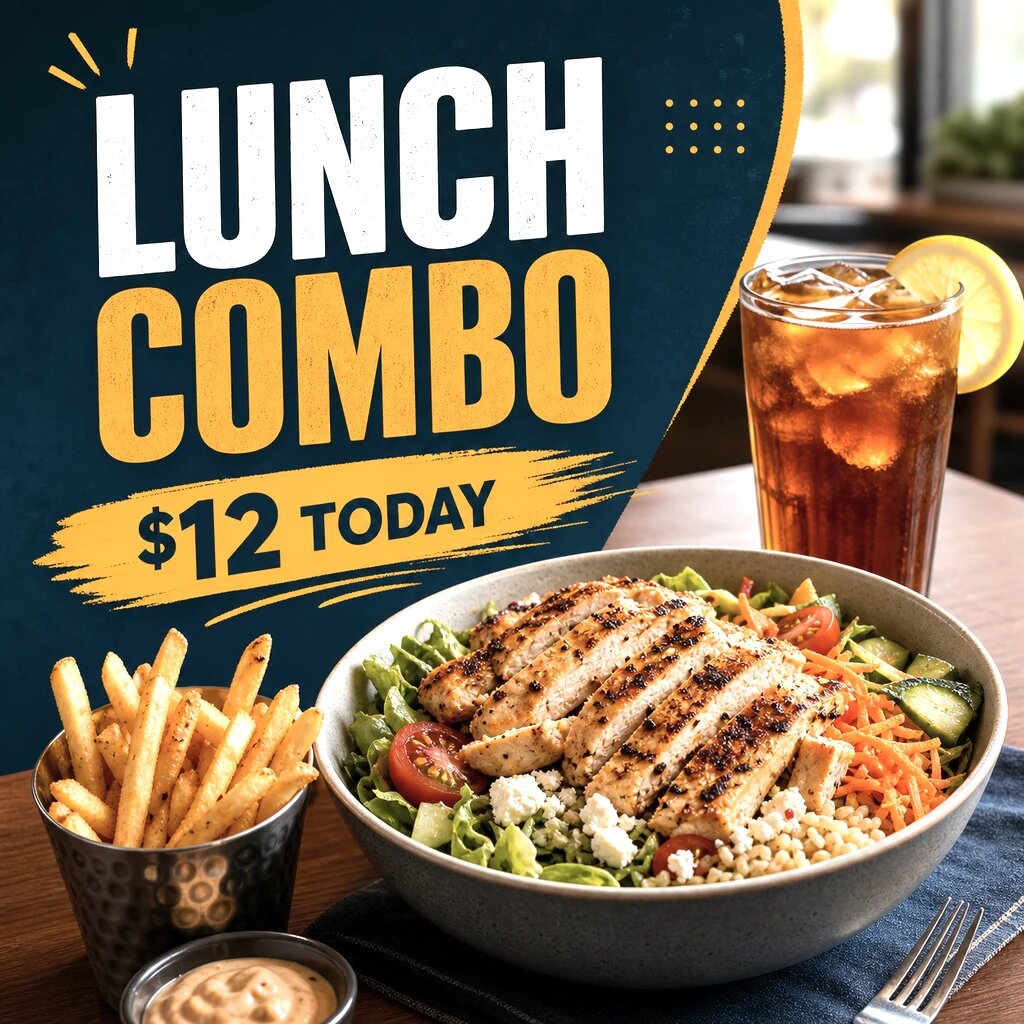
An AI food photography generator helps restaurants, delivery brands, recipe creators and CPG teams create polished food visual concepts without booking a full shoot for every idea. kublaro is built for prompt-to-visual work: describe the dish, lighting, surface, crop and use case, then let Smart Routing choose a strong image or video route.
This is useful for concepting, menu refreshes, social campaigns, seasonal specials and packaged food launches. It is not a replacement for truth in menu representation. If a customer will order a specific dish, use references and avoid publishing images that promise ingredients, portion sizes or plating you do not serve.
Why food teams use kublaro
Food visuals are about appetite cues: light, texture, color, steam, glaze, crumb, garnish and context. A flat prompt like "burger photo" usually leaves too much to chance. A better prompt names the dish, camera angle, lighting, plate, surface and brand mood.
kublaro supports that workflow with text-to-image, image-to-video, batch generation, multilingual prompts, 30+ style packs, outputs up to 4K and commercial licensing under its paid product terms. For teams that do not want to manually test every model, Smart Routing can pick from 16 state-of-the-art models based on the prompt.
Smart Routing for food photography
For still food imagery, kublaro can route prompts across FLUX.2 Pro, GPT Image, Seedream 4, Nano Banana 2, Recraft V3, Ideogram V3 and Qwen-Image. That gives you room to explore different needs: photorealistic plating, graphic recipe cards, packaging mockups, ad concepts or clean delivery-app thumbnails.
For motion, approved images can move into video routes such as Google Veo 3.1, Kling 3.0 Pro, Seedance 2.0, MiniMax Hailuo 02, Wan 2.5, Luma Ray 2, LTX-2 and PixVerse. Use these for a slow push-in, steam rising from a bowl, a sauce pour, a product reveal or a short social clip.
Food visual workflows
| Workflow | Best use | Prompt focus |
|---|---|---|
| Restaurant menu concepts | New dishes, specials and menu refreshes | Dish name, plating, portion, angle and truthful ingredients |
| Delivery listing images | Square thumbnails for ordering apps | Clear hero dish, simple background, bright appetizing light |
| Recipe creator visuals | Blog posts, reels covers and step visuals | Ingredients, surface, hands or tools, home-kitchen mood |
| CPG campaign scenes | Packaged snacks, drinks and grocery products | Package accuracy, props, brand colors and retail context |
| Batch style exploration | Compare multiple looks before a shoot or launch | Same dish with varied lighting, crop and background |
| Image-to-video | Social clips and landing-page motion | One clean still plus simple motion, camera and timing cues |
Prompting for better food results
Start with the real food facts. Name the dish, main ingredients, portion size and plating details. Then add the photographic setup: "45-degree angle," "overhead flat lay," "soft window light," "dark slate surface," "white ceramic bowl," or "bright delivery-app thumbnail."
For a restaurant menu item, a strong prompt might be: "actual menu concept for spicy chicken ramen, rich red broth, sliced chicken, soft egg, scallions, black bowl, 45-degree angle, warm side light, simple wooden table, realistic restaurant food photography." If exact representation matters, add a reference image and keep the prompt grounded in what the kitchen serves.
For packaged food or CPG work, describe the product as carefully as the scene. AI can distort labels, logos, nutrition panels and package proportions, so final campaign assets should be checked closely before publishing.
Honest limitations
AI food photography is strongest for visual direction, appetizing concepts, social variants and campaign exploration. It can struggle with exact ingredient counts, brand labels, regulated packaging details, hands and utensils. Generated food may look better than the real item if prompts are too idealized.
The practical approach is to use kublaro for fast creative range, then curate carefully. For menus and delivery listings, be conservative: match the real dish, avoid misleading portion sizes and keep a real-photo reference nearby.
Pricing and next step
kublaro has no free tier. Monthly USD plans are Trial $10, Starter $20, Plus $50 and Pro $100. Annual billing is about 40% off, and one-time credit top-ups are available for seasonal menu work, batch testing or campaign sprints.
For adjacent pages, see AI food photography, the food menu photo generator, AI visuals for restaurants and the AI product photography generator. When you are ready to plan production volume, review kublaro pricing or start creating.
Frequently asked questions
What is an AI food photography generator?+
It is a tool that creates food images from prompts or references, including menu concepts, recipe shots, ingredient scenes and packaged-food campaign visuals.
Can kublaro represent my exact menu item?+
It can get close when you provide a clear prompt and reference image, but AI output should be reviewed against the real dish before menus, delivery apps or packaging use.
Which models can kublaro use for food visuals?+
Smart Routing can use image models such as FLUX.2 Pro, GPT Image, Seedream 4, Nano Banana 2, Recraft V3, Ideogram V3 and Qwen-Image.
Can I turn a food image into a video?+
Yes. You can move approved stills into image-to-video routes such as Google Veo 3.1, Kling 3.0 Pro, Seedance 2.0 or MiniMax Hailuo 02.
Does kublaro have a free tier?+
No. kublaro is paid-only, with monthly USD plans: Trial $10, Starter $20, Plus $50 and Pro $100, plus annual savings and credit top-ups.
Make it with kublaro
Describe anything and generate stunning images in seconds; then bring them to motion with the best AI video models.